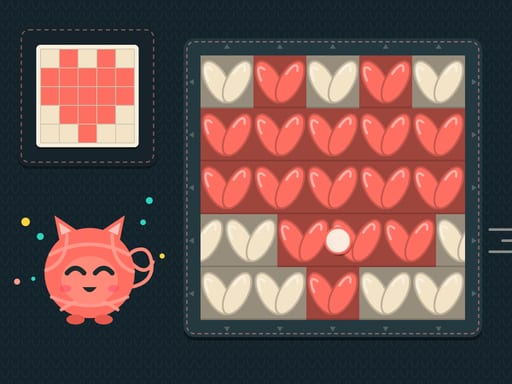
Slide knitted rows and columns until the motif returns.
Controls
| Swipe or drag | Slide a row sideways or a column up and down; it wraps round the edge |
|---|---|
| Tap or click | Put the cursor on a stitch |
| Arrow keys | Slide the cursor's row or column one stitch |
| W A S D | Move the cursor |
| U | Undo a move |
| R | Restart the level |
Loomi’s take
Somebody has been tugging at my knitting. Every swatch in this basket started life as a neat little picture, a heart or a tulip or a sailboat, and now its rows and columns have been shoved out of line. The chart pinned in the corner shows what it should look like. My job, and yours, is to slide the stitches back.
The fabric is knitted in the round, so nothing ever falls off. Push a row to the right and the stitch on the end pops back in on the left. It feels like turning a dial until the picture clicks.
Reading the card
The card at the top shows the chart on graph paper, then the level name, your moves, the par, and a row of stars with the most moves that still keep that rating. The teal bar below counts how many stitches already match the chart, for example 13/25 on a 5x5 swatch.
How a move counts
Swipe anywhere on the swatch. Whichever direction you move furthest wins, so a slightly crooked swipe still picks the right row or column. The lane follows your finger and snaps to the nearest stitch when you let go. A drag of about a quarter of a stitch is enough to move it one place.
A move is one lane slid any distance. Sliding a row three stitches in one go is one move, and nudging the same row again right after is still that same move. If you slide a lane back to where it started, the move is cancelled and the counter drops. Undo is free and unlimited, and so is Restart.
If swiping is fiddly, tap a stitch to put the yellow cursor on it, then use the coral left and right buttons for its row and the teal up and down buttons for its column. The cursor travels with its stitch, so pressing the same arrow again keeps working the same lane.
Felted and cabled lanes
From level 7 some swatches have structure knitted in. A felted lane has been matted solid. It has a fuzzy look and a felt tab with a pink pin at each end, and it refuses to slide. Stitches can still pass through it on the lanes that cross it, so you have to route colours around it rather than through it.
From level 9 you will meet cables: two neighbouring rows or columns joined by a twisted rope in the margin. Drag either one and both slide together. Fixing the top row of a cable always shifts its partner too, so plan the pair as one piece. Some late swatches use two cables, or a cable and a felt, at once.
The thirty swatches
Levels 1 to 4 are 3x3 charts (Little Heart, Tulip, Kiss Stitch, Daisy) that need one or two moves. Levels 5 to 12 move up to 4x4, plus a 3x5 Little Fish and a 4x6 Chevron, with par 2 to 3. Levels 13 to 20 are 5x5 pictures such as the Star, the Toadstool and Little Loomi, with par 3 to 5. Levels 21 to 30 are 6x6 swatches, including the Fair-Isle Band, two argyles, the Sailboat, the Night Cat and, to finish, Loomi’s Portrait, with par 4 to 6.
Stars and par
Every level was scrambled from its chart by a fixed set of slides, and par is the exact shortest solution, found by a full search of the puzzle. The star limits are deliberately roomy and grow with the grid. A 3x3 level with par 1 gives three stars up to 3 moves, and the final 6x6 with par 6 gives three stars up to 13 moves and two stars up to 25. Any finish earns at least one star, and the next level unlocks either way.
Loomi’s tips
- Start with lanes that are almost right. If a row holds the right colours in the wrong order, one slide can fix all of it.
- Watch the teal bar. A slide that knocks the count down usually means you moved a lane that was already finished.
- Fix felted lanes first in your head. They can’t move, so the lanes crossing them have to bring the right colours to them.
- With a cable, solve for the harder row of the pair and check what the other row does.
FAQ
Can I get stuck? No. Every swatch can always be solved, and Undo and Restart are free.
Why didn’t my swipe move anything? Either it was shorter than about a quarter of a stitch, or it started on a felted lane.
Is there a hint? After 20 seconds on a level, a light-bulb button can show up next to Restart. It is optional: watch a short ad and the swatch shows your next slide, or how many undos bring you back on track first. A level finished with a hint earns 1 star.
Game details
| Developer | LoomiPlays Studio |
|---|---|
| Provided by | LoomiPlays Studio |
| Works on | Desktop, tablet and mobile browsers |
| Best orientation | Portrait |
| Added to LoomiPlays | October 19, 2026 |