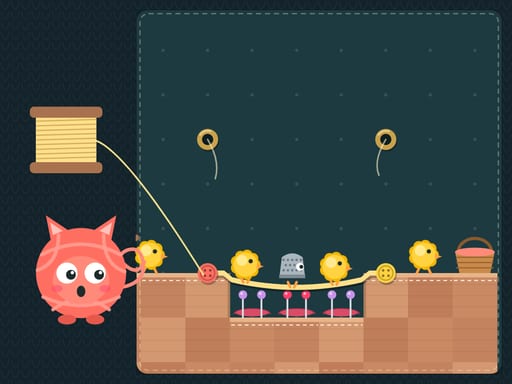
Sew thread bridges that sag under marching critters.
Controls
| Tap or click | Tap two button holes to sew a thread; tap a thread to add a strand |
|---|---|
| Drag | Drag from one button hole to another to sew in one move |
| Space or Enter | GO |
| U / Z / Backspace | Undo the last stitch |
| F | Switch the march between normal and double speed |
Loomi’s take
I love watching the little ones leave their cotton-reel hut. The chicks bounce, the thimble-bugs clank, and nobody looks down. Your job is to put something under their feet when the table runs out.
The catch is that thread is soft. One strand across a wide gap looks fine while it hangs empty, but put five chicks on it and it dips. If it dips onto a pin, it snaps. So I plan, I check the dashed line, and only then do I press GO.
A level from plan to march
Every level is a sewing-table board dotted with brass eyelets, the button holes. Tap one hole and then another, and a thread is sewn between them with a button at each end. The second button stays picked, so you can keep tapping to chain spans into a longer bridge. Holes you can legally reach from the picked button glow teal. A thread can’t run through a fabric block or climb steeper than one and a half cells up for each cell across.
When the plan looks right, press GO. The critters leave the hut one every 0.9 seconds and walk exactly one cell apart. They take the highest path under their feet, turn around at walls and at the edge of the board, and drop off the end of any thread that stops in mid-air. Drops are harmless unless they end in pins, scissors or off the table. If the march goes wrong, tap Stop & fix or wait for the banner. Your threads stay put, so you can change them and try again as often as you like.
Why the thread sags
Each thread’s dip is its length times 0.04, plus 0.03 for every unit of weight standing on it, divided by its number of strands. A chick weighs 1 and a thimble-bug weighs 2. Because the marchers are one cell apart, a longer span carries more of them at once, so long spans sag far more than short ones.
While you plan, a dashed line under every thread shows the most it will dip with the heaviest group that fits on it. Teal means it clears everything. Coral with a ”!” means it would touch a pin tip or a blade. You have three fixes:
- Add strands. Tap the thread. Two strands halve the dip and three cut it to a third, but each strand costs the full length again. Tapping a triple thread snips it off.
- Split the span. Route through a higher button hole. The path gets a little longer, but each piece is short and stiff.
- Go around. A thread can stop in mid-air and let them drop past the danger.
Three stars, three questions
On tall screens the three goals are listed above the board. Did enough critters reach the basket? That’s 1 star. Did every one of them make it? That’s 2. Did you use no more thread than the star mark on the spool gauge? That’s 3. The star mark is set about 30 percent above the cheapest plan our solver found, so you don’t need a perfect solution. The spool always holds enough to double every thread of that plan.
How the 30 levels build up
Levels 1 to 3 cover one deep gap, the first pin pit and the first double strand. Then come ramps, walls that turn the march around (Turnabout, Back Door) and the first scissors (Snip Snip). Thimble-bugs first appear in level 14, and from there the crowds get heavier. Later boards mix climbs, drops and pits: Hop and Drop, Pillar Hop, Spool Tower and the zig-zag Switchback.
Loomi’s tips
- Read the dashed line, not the thread. An empty thread always looks safe.
- Before adding a strand, price a detour. A higher hole often costs less than doubling a long span.
- Count the thimble-bugs. Two of them side by side weigh as much as four chicks.
- A thread that ends in mid-air isn’t always a mistake. Check what’s below the last button.
- If the march turns back at a wall, follow it with your eyes. The way home is sometimes behind the hut.
FAQ
Do I lose the level if critters fall? No. If too few reach the basket, the plan comes back untouched so you can fix it.
Why did a thread snap when the dashed line was teal? It shouldn’t. The dashed line shows the heaviest load that fits on the span, so a teal thread holds while the march stays in line.
How do I remove a thread? Tap it until it has three strands, then tap once more to snip it, or use Undo or Clear.
Is there a hint? After a march that falls short, a Hint button can show up beside Clear. It is optional: watch a short ad and one thread of a bridge that works lights up on the board. A level cleared with a hint earns 1 star, so the other two stay a reward for planning it yourself.
Game details
| Developer | LoomiPlays Studio |
|---|---|
| Provided by | LoomiPlays Studio |
| Works on | Desktop, tablet and mobile browsers |
| Best orientation | Portrait |
| Added to LoomiPlays | October 19, 2026 |